
In our Python tutorial, we asked the API "is the code here yet?" every few seconds. That works, but it's a bit like refreshing your inbox all day.
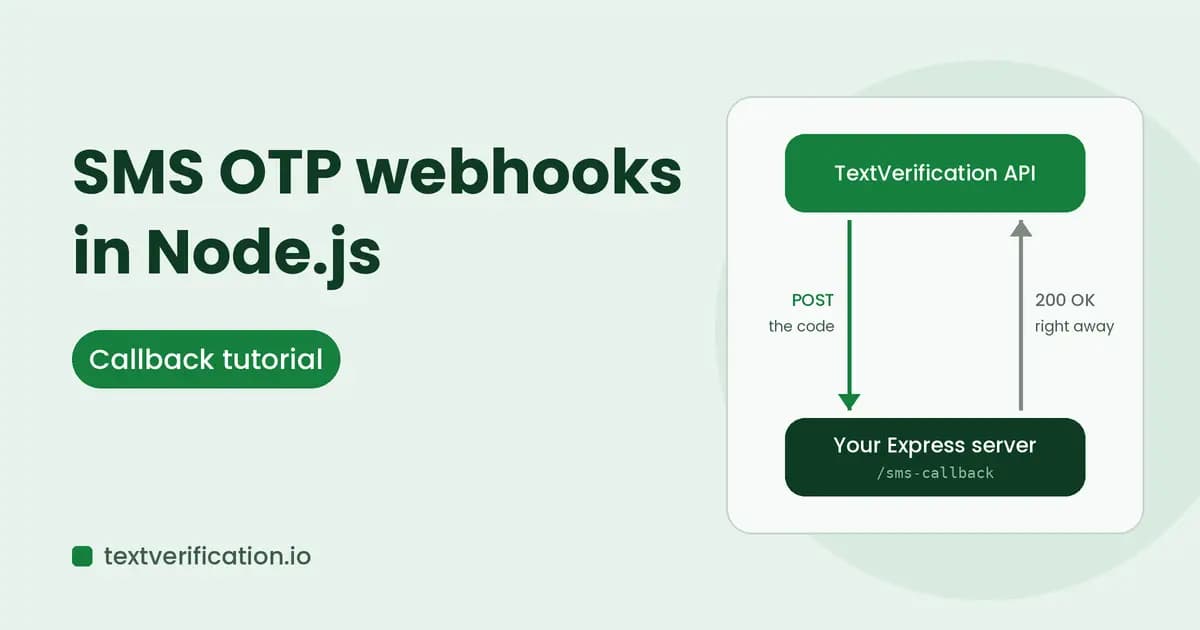
There's a nicer way. You give the API a web address, and when the SMS arrives, the API sends the code to your server. No refreshing. This is called a callback, or a webhook, and in this tutorial we'll build one in Node.js with Express.
Polling vs callbacks: which should you pick?
Polling | Callback (webhook) | |
|---|---|---|
How it works | Your code keeps asking the API | The API calls your server when the code arrives |
Setup | Very simple, no public URL needed | Needs a public HTTPS address |
Speed | Delay of up to one polling interval | Code arrives as soon as it's received |
API calls | Many | One incoming call per code |
Best for | Quick scripts, first experiments | Larger test suites, long-running apps |
Short version: start with polling, move to callbacks when your tests grow.
What we'll build
A small Express server with one job: receive the callback, remember the code, and let your test code wait for it with a single line. You'll also see how to test it from your own laptop, and how to make it safe against duplicates and strangers.
As always, this is for testing your own sign-up and two-factor flows, or other lawful verification needs. Follow the terms of any service you verify with.
What you need
Node.js 18 or newer (it has
fetchbuilt in)A TextVerification account, balance, and API key. You can create a free account here.
A tunnel tool such as ngrok, to make your local server reachable from the internet
The API guide open in another tab, for exact field names
Step 1: Set up the project
mkdir otp-callback && cd otp-callback
npm init -y
npm install express
Set two environment variables. The callback secret is a long random string that you make up. It goes in your callback URL so strangers can't post fake codes to your server.
export TV_API_KEY='your_api_key_here'
export CALLBACK_SECRET='paste-a-long-random-string-here'
On Windows PowerShell, use $env:TV_API_KEY='...' instead of export.
Step 2: Build the callback server
Create server.js:
const express = require('express');
const crypto = require('crypto');
const { EventEmitter } = require('events');

const app = express();
app.use(express.json());

const SECRET = process.env.CALLBACK_SECRET;
if (!SECRET) throw new Error('Set CALLBACK_SECRET first');

const codes = new Map();
const bus = new EventEmitter();

function safeEqual(a, b) {
  const x = Buffer.from(String(a));
  const y = Buffer.from(String(b));
  return x.length === y.length && crypto.timingSafeEqual(x, y);
}

app.post('/sms-callback/:token', (req, res) => {
  if (!safeEqual(req.params.token, SECRET)) {
    return res.status(404).end();
  }

  // TODO: confirm the callback payload field names in the API guide
  const { orderId, code } = req.body || {};

  if (orderId && code) {
    const id = String(orderId);
    if (!codes.has(id)) {
      codes.set(id, code);
      bus.emit(id, code);
    }
  }

  res.status(200).json({ ok: true });
});

function waitForCode(orderId, timeoutMs = 900000) {
  const id = String(orderId);

  return new Promise((resolve, reject) => {
    if (codes.has(id)) return resolve(codes.get(id));

    const timer = setTimeout(() => {
      bus.removeListener(id, onCode);
      reject(new Error('Timed out waiting for the code'));
    }, timeoutMs);

    function onCode(code) {
      clearTimeout(timer);
      resolve(code);
    }

    bus.once(id, onCode);
  });
}

app.listen(3000, () => console.log('Listening on port 3000'));

module.exports = { waitForCode };
Let's walk through the parts that matter.
The secret in the URL. Any request whose token doesn't match gets a 404, so scanners and strangers learn nothing. We compare with timingSafeEqual so the check can't be guessed byte by byte.
Order ID as a string. An order ID might arrive as a number in one place and a string in another. Turning both into strings stops a mismatch from making your code wait forever for something that already arrived.
Ignoring duplicates. If the first reply is slow, the API retries and your server can get the same code twice. The codes.has(id) check makes the second one harmless. Developers call this an idempotent handler.
Replying right away. The handler sends 200 immediately. If your server takes too long, the API may think the delivery failed and send it again.
Step 3: Request a number and wait
Create run-test.js. It asks the API for a number, then waits for your server to receive the code:
const { waitForCode } = require('./server');

const BASE_URL = 'https://textverification.io/api/v1';

async function requestNumber(serviceId) {
  const res = await fetch(`${BASE_URL}/users/request-s1-service`, {
    method: 'POST',
    headers: {
      Authorization: `Bearer ${process.env.TV_API_KEY}`,
      'Content-Type': 'application/json',
    },
    // TODO: if the API guide says the callback URL is set per request, add it here
    body: JSON.stringify({ serviceId }),
  });

  if (!res.ok) {
    throw new Error(`API error ${res.status}: ${await res.text()}`);
  }

  const body = await res.json();
  return body.data;
}

(async () => {
  const order = await requestNumber(process.argv[2]);
  console.log('Order ID:', order.orderId);
  console.log('Use this number in your app:', order.number);

  const code = await waitForCode(order.orderId, order.expiredIn * 1000);
  console.log('Your code:', code);
  process.exit(0);
})().catch((err) => {
  console.error(err.message);
  process.exit(1);
});
The number request is the same one we used in the Python version. The response includes an orderId, the number to use, and expiredIn, the number of seconds it stays valid.
Step 4: Make your laptop reachable
The API can't reach localhost, so open a tunnel. In a second terminal:
ngrok http 3000ngrok prints a public HTTPS address, something like https://abc123.ngrok-free.app. Your full callback URL is that address plus the path and your secret:
https://abc123.ngrok-free.app/sms-callback/paste-a-long-random-string-hereNow register this URL the way the API guide describes. Depending on the product, that may be a setting in your dashboard or a field you send with the request. This is the TODO from the code above.
Step 5: Run it
node run-test.js YOUR_SERVICE_IDThe script prints a number. Enter it in the app you're testing, and when the SMS arrives you'll see the code appear in your terminal a moment later, without a single polling request.
Troubleshooting
What you see | Likely cause |
|---|---|
Nothing ever arrives | Tunnel is down, URL has a typo, or the callback was never registered |
Your server logs show a 404 | The secret in the URL doesn't match |
The same code shows up twice | Normal. Retries happen, and the handler ignores the repeat |
Works on your laptop, not on a server | The server needs a public HTTPS address and an open port |
Code arrives but the script keeps waiting | Order ID mismatch. Make sure both sides use the same string |
Making it production-ready
This version keeps codes in memory, which is fine for experiments. For a real test pipeline, add a few things:
Store codes outside the process. Use Redis or a database, so a restart or a second server doesn't lose them.
Use HTTPS only. Never expose the callback over plain HTTP.
Keep the secret secret. Don't print full callback URLs in logs.
Add a fallback. If a callback never shows up, fall back to polling, like in our Python tutorial.
Check the guide for signatures. If the API signs its callbacks, verify the signature too, in addition to the secret path.
Quick FAQ
Does the callback cost extra? Check the pricing and API guide for details. Numbers are priced per order, and if no code arrives before expiry, the amount returns to your balance automatically.
What if my server is down when the code arrives? The API retries automatically, so a short outage usually doesn't lose the code. A long one might, so keep a polling fallback for important tests.
Can I use this with Express alternatives like Fastify or Koa? Yes. The idea is identical: verify the secret, read the body, store the code, reply 200 fast.
Is it fine to use this for testing my own app? Yes, that's one of the main uses. For other uses, follow the rules of whichever service you're verifying with.
The takeaway
A callback turns "keep asking" into "tell me when it's here." With about 60 lines of Express, a secret in the URL, and a tunnel for local testing, you can let the code come to you.
Ready to build it? Get your API key and keep the API guide handy for the exact payload fields.